
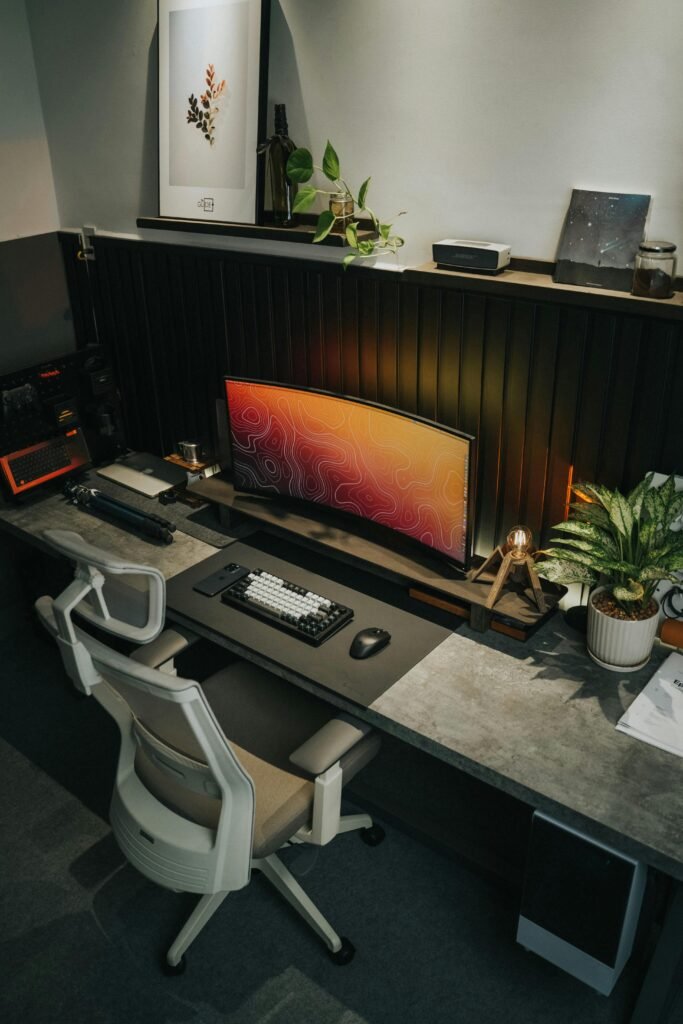
Most men work from wherever they happen to be sitting. The kitchen table. The couch. A corner of the bedroom with a laptop balanced on a pillow.
This is not a workspace. It is an absence of one.
The man who builds a proper home office builds something more than a place to work. He builds an environment that signals to his brain that it is time to focus, that respects the work he is doing, that separates professional life from personal life in the way that a dedicated space makes possible.
The right home office makes you more productive, more creative, and more satisfied with the work you do in it. Here is how to build one worth having.
The Space — Choose It Deliberately
The home office requires a dedicated space. Not a corner of the bedroom. Not the kitchen table. A room with a door that closes.
The door is not a luxury. It is a necessity. The ability to close it signals to everyone in the home that you are working. It signals to your own brain that work has begun. It eliminates the ambient distraction of household life that makes sustained concentration impossible.
If a dedicated room is not available the next best option is a dedicated corner of a room screened from the rest of the space — a bookcase, a room divider, a strategic arrangement of furniture that creates visual separation from the living space.
What matters is the psychological boundary as much as the physical one. The mind works better when work has a place that is unambiguously for work.
The Desk — The Foundation of Everything
The desk is the most important piece of furniture in the home office. Get it right.
Size — Bigger than you think you need. A desk that feels spacious when empty feels cramped when populated with a monitor, keyboard, mouse, notebook, coffee, and the various objects that accumulate in a working day. Minimum 60 inches wide for a serious working desk.
Height — Standard desk height is 29-30 inches, designed for the average person. If you are significantly taller or shorter than average a fixed-height desk may not work ergonomically. An adjustable desk solves this and adds the option to stand.
The standing desk — The most significant ergonomic upgrade available in a home office. Alternating between sitting and standing throughout the day reduces back pain, improves energy levels, and has measurable effects on metabolic health.
What to buy: Uplift V2 — The benchmark standing desk. Stable at all heights, wide range of surface options, excellent warranty. $800-1,200 depending on configuration.
Flexispot E7 — The most recommended alternative at a lower price point. Comparable stability and range. $500-700.
A fixed desk for the man who will not stand: West Elm Parsons Desk — clean lines, solid construction, available in multiple sizes and finishes. IKEA Alex — the most recommended budget desk for a reason. Drawer storage integrated, stable, unpretentious.
The Chair — The Investment Most Men Resist and Should Not
You will spend thousands of hours in your office chair. The math on investing in a good one is straightforward.
A bad chair produces back pain, neck pain, reduced concentration, and over years real physical consequences. A good chair does the opposite. The cost per hour of a quality chair over its useful life is negligible. The cost per hour of chronic back pain is not.
Herman Miller Aeron — The benchmark. Three sizes to fit different body types. Adjustable in every relevant dimension. Used by architects, designers, and knowledge workers who care about their bodies. $1,400-1,800. Worth it.
Herman Miller Embody — Designed with input from physicians and ergonomists. Superior lumbar support. The choice for the man with existing back issues. $1,900-2,200.
Steelcase Leap — The alternative to Herman Miller. Preferred by many ergonomists for its natural recline mechanism. $1,200-1,500.
Secretlab Titan — For the man who wants something more aesthetically aggressive. Gaming chair construction with genuine ergonomic consideration. $400-500.
The Monitor Setup — See Your Work Correctly
The laptop screen is not sufficient for serious work. A proper external monitor — or two — dramatically increases the usable workspace and reduces the neck strain produced by looking down at a laptop display.
Single monitor — 27 inches minimum. 4K resolution for sharp text rendering. LG 27UK850 or Dell U2720Q are the standards at this size.
Ultrawide monitor — 34-49 inches, curved, 21:9 or 32:9 aspect ratio. Replaces a dual monitor setup with a seamless panoramic display. LG 34WN80C for the 34 inch standard. Samsung Odyssey G9 for the 49 inch extreme option.
Dual monitor — Two monitors side by side on an adjustable arm. VIVO dual monitor arm removes the monitors from the desk surface entirely, frees significant desk space, and allows precise positioning. The dual monitor arm is one of the highest-value upgrades in a home office at $50-100.
Monitor height — the top of the monitor should be at or slightly below eye level when seated correctly. Most monitors on their built-in stands are too low. A monitor arm or a monitor stand corrects this.
The Peripherals — The Tools You Touch Every Day
Keyboard — The keyboard is the primary physical interface with your work. It deserves consideration beyond the one that came with your computer.
A mechanical keyboard produces a tactile and auditory feedback that many people find improves typing speed and accuracy. It also lasts significantly longer than membrane keyboards.
Keychron K2 — Wireless, compact, available in multiple switch options, excellent build quality at $90. The most recommended mechanical keyboard for office use.
Apple Magic Keyboard — For the Mac user who wants the native experience in a compact footprint. $100.
Logitech MX Keys — For the man who wants a premium feel without mechanical switches. Near-silent, excellent key travel, multi-device connectivity. $110.
Mouse — The right mouse eliminates wrist strain and improves precision.
Logitech MX Master 3 — The benchmark productivity mouse. Ergonomic form factor, precision scroll wheel, multi-device support, rechargeable. $100.
Apple Magic Mouse — For the Mac ecosystem. Controversial ergonomics but native gesture support. $80.
Headphones or speakers — For the man who works with audio — calls, music, ambient sound — quality audio is a quality of life issue in the home office.
Sony WH-1000XM5 — The best noise canceling headphones for office use. Extraordinary isolation, excellent sound quality, comfortable for long sessions. $350.
Bose QuietComfort 45 — The alternative. Slightly more comfortable for longer sessions, slightly less accurate noise canceling. $280.
Audioengine A2+ speakers — For the man who prefers speakers over headphones. Compact, excellent sound quality for their size, USB powered. $270.
The Lighting — The Most Underrated Variable
Most home offices are lit badly. Overhead lighting that creates glare on screens. Insufficient light that causes eye strain. No consideration for the quality of light and what it does to the space and the man working in it.
Natural light — Position the desk to receive natural light from the side — not behind the monitor causing glare and not directly in front of you causing you to squint into brightness. Natural light is the best working light available and the most psychologically beneficial.
Desk lamp — A quality adjustable desk lamp provides task lighting for paper work and reduces eye strain. BenQ ScreenBar mounts on the monitor and illuminates the desk without reflecting on the screen. Remarkable and inexpensive at $110.
Bias lighting — LED strips mounted behind the monitor that illuminate the wall behind it. Reduces contrast between the bright screen and dark surroundings, reducing eye fatigue significantly. Govee makes simple strips at $30 that produce a meaningful improvement.
Ambient lighting — A floor lamp or table lamp in the corner of the office creates warmth and depth that overhead lighting cannot. Hay Matin or any simple, well-designed floor lamp transforms the quality of the space.
The Organization — A Clear Space Produces a Clear Mind
The relationship between physical order and mental order is not mystical. It is practical. A cluttered desk produces cognitive overhead — the minor but constant distraction of visual noise that accumulates until focus becomes difficult.
Cable management — The cables of a modern home office left unmanaged are chaos. A IKEA Signum cable tray under the desk routes cables invisibly. Cable clips along the desk edge keep individual cables organized. Velcro ties bundle cables cleanly. None of this is complicated. All of it makes the space look and feel dramatically better.
Storage — A filing cabinet or drawer unit for documents and supplies. A shelf or bookcase for reference materials, books, and the objects that belong in a working space. Everything that does not belong in the working space should not be in the working space.
The desktop — One notebook. One pen. One coffee cup. Whatever is actively being worked on. Nothing else. The discipline of a clear desktop is a discipline of mind as much as of space.
The Atmosphere — Make It Worth Being In
The home office should be a place you want to go to — not a place you go to because you have to.
A plant — Something living in the workspace improves air quality measurably and improves mood measurably. The research on this is consistent. A Pothos or Snake Plant thrives in office conditions with minimal care.
Art — Something on the walls that is worth looking at. Not a motivational poster. A print, a photograph, a painting — something that reflects who you are and makes the space feel like yours.
Books — A shelf of books in a workspace signals something about the man who occupies it. To himself as much as to anyone else. Surround yourself with the thinking of people you want to think like.
Temperature — The optimal temperature for cognitive work is 70-77°F. Cooler than most people maintain their homes. A small space heater or fan maintains the specific temperature of the office independently of the rest of the house.
Scent — A subtle candle or diffuser with a clean, non-distracting scent — cedar, sandalwood, vetiver — creates a sensory environment that the brain associates with focus over time. The same scent used consistently in the workspace becomes a focus trigger.
The Routine — The Office Requires One
The home office solves the problem of space. The routine solves the problem of time.
Without a routine the home office is just a room with a desk. With one it is a place where work happens consistently, predictably, and with intention.
Start at the same time every day. Close at the same time. Have a ritual that begins work — the same sequence of actions that signals to your brain that focus is required. Coffee made. Notebook opened. Phone placed face down. Music or silence selected. The ritual that begins the work session is as important as the space it occurs in.
The Investment
A properly equipped home office — desk, chair, monitor, peripherals, lighting, organization — costs $3,000-6,000 depending on choices made. Over five years of daily use that is $1.64-3.29 per day.
The productivity improvements, the physical health benefits, the absence of the commute, and the quality of the environment in which you spend eight hours of your day make that one of the most defensible investments a man can make.
Build it correctly. Use it deliberately. Close the door.
There Goes That Man. The search is over.